Text-to-SQL for Governed Analytics
ContexKit converts natural language into SQL you can trust—grounded in your schema, aligned to your business rules, and backed by audit traces.
- Natural language → SQL
- Schema-aware
- Auditable results
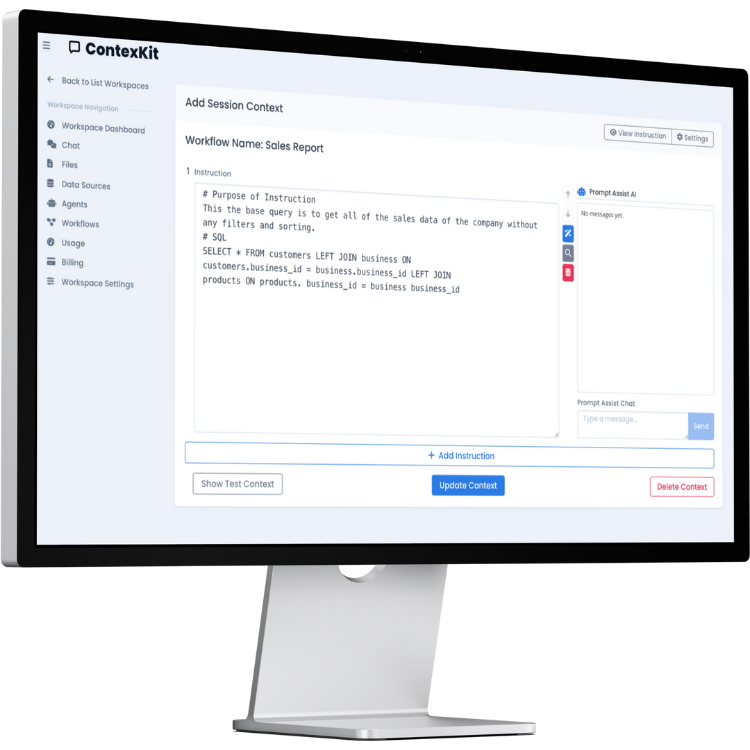
What does “text to SQL” mean?
Text-to-SQL converts a question written in natural language into a SQL query. Done well, it isn’t just translation—it’s interpretation using your schema and rules so results match what your organization means by “revenue”, “active customer”, or “churn”.
You’ll also see this called natural language to SQL, NL2SQL, or an AI SQL generator. The hard part isn’t the syntax—it’s interpretation: choosing the right joins, filters, metric definitions, time windows, and segmentation to match your business.
Governed text-to-SQL means queries are predictable and reviewable, especially in enterprise databases. That’s why ContexKit emphasizes schema grounding, guardrails, and audit traces rather than “magic” results.
What production-grade text-to-SQL includes
- Schema grounding (tables, columns, relationships)
- Canonical joins and guardrails
- Metric definitions and glossary alignment
- Output formats with result validation
- Audit traces for what was generated and executed
Why it matters
- Faster answers for non-technical stakeholders
- Fewer ad-hoc queries and one-off dashboards
- Reusable business logic across teams
How ContexKit helps
- Schema-aware contexts (tables, joins, rules)
- Auditable traces of what was generated and run
- Governed access with least-privilege credentials
If you want an end-to-end assistant that runs queries and returns results with workflows, see the SQL Agent overview. If you need controlled actions beyond querying, see the Database Agent for governed operations.
Text-to-SQL example questions
Examples that map to common business functions.
Sales
- What were total sales this month?
- Which product has the highest margin?
- Show weekly revenue trends for Q4.
Operations
- Which items are low on stock?
- What’s the average fulfillment time?
- List delayed orders by warehouse.
Finance
- What’s our gross margin by category?
- Which expenses exceeded budget last quarter?
- Show AR aging by customer.
Examples are illustrative—your schema and definitions drive the exact query.
Revenue trend by week
User question: Show weekly revenue trends for the last 8 weeks.
SELECT week_start, SUM(total_amount) AS revenue
FROM orders
WHERE order_date >= CURRENT_DATE - INTERVAL '56 days'
GROUP BY week_start
ORDER BY week_start;
Returned output: Table + 1–2 sentence summary
- Context version
- SQL hash
- Execution timestamp
- Row count
Top products by margin
User question: Which products had the highest gross margin last quarter?
SELECT product_name, SUM(margin) AS total_margin
FROM order_lines
WHERE order_date >= '2025-07-01' AND order_date < '2025-10-01'
GROUP BY product_name
ORDER BY total_margin DESC
LIMIT 10;
Returned output: Top-10 table + short summary
- Context version
- SQL hash
- Execution timestamp
- Row count
AR aging by customer
User question: Show AR aging by customer.
SELECT customer_id, SUM(balance) AS ar_balance
FROM invoices
WHERE status = 'open'
GROUP BY customer_id
ORDER BY ar_balance DESC;
Returned output: Table + aging buckets summary
- Context version
- SQL hash
- Execution timestamp
- Row count
Make text-to-SQL reliable
The difference between a demo and production text-to-SQL is governance and context: definitions, joins, permissions, and review.
Schema grounding
Limit the agent to the right tables and relationships so it can’t “guess” your data model.
Business rules
Define what key metrics mean so results match how your org reports numbers.
Auditability
Review generated SQL and traces to validate accuracy and improve over time.
For governed query execution, explore the SQL Agent overview. For controlled actions beyond queries, see the Database Agent for workflows.
How text-to-SQL works (in practice)
High-quality natural language to SQL follows a repeatable workflow: understand the question, ground it to schema, generate safe SQL, and return results with consistent formats and traceability.
1) Parse the question
Identify entities, time range, metrics, and segments.
2) Ground to schema
Map to tables, columns, and canonical joins.
3) Generate + validate SQL
Use safe patterns, limits, and policy checks.
4) Execute + format results
Return a table and a short narrative summary.
Best practices
Start with read-only credentials, create a metric glossary, pin canonical joins, add examples for tricky queries, and review traces to iterate.
Accuracy and common failure modes
Text-to-SQL accuracy is limited by ambiguity and schema mismatch. Most errors come from unclear definitions or missing context—not the SQL syntax.
Common causes of wrong answers
- Ambiguous metric definitions
- Missing joins or wrong join path
- Hidden filters (e.g., cancelled orders)
- Time zone or time window mismatch
- Grain mismatch (order vs line item)
How to improve accuracy
- Define glossary + KPI rules
- Provide canonical joins
- Constrain accessible tables/columns
- Use examples for edge cases
- Require SQL preview + review for critical queries
Before trusting results
- Check the SQL and filters for your intended definitions
- Verify the join path and grain
- Confirm time ranges and time zone assumptions
- Compare against known benchmarks when possible
Governance for text-to-SQL
Governed text-to-SQL means predictable, reviewable queries—not magic. It’s how teams safely scale natural language SQL across the organization.
Safety controls
- Least-privilege credentials (read-only default)
- Table/column allowlists
- Row-level constraints (can respect existing RBAC/RLS)
- Query limits and timeouts (configurable)
- Audit traces for review
Why governance matters
When definitions and permissions are explicit, a text-to-SQL system produces consistent answers and reduces risk. If you need an assistant that executes queries and returns governed results, see the SQL Agent overview.
For broader workflows that include controlled actions, review the Database Agent for governed operations.
Use cases by role
Text-to-SQL helps each team answer questions faster without writing SQL every day.
Finance
- AR aging, margin, and budget variance
- Period-over-period revenue checks
- Monthly close validation queries
Natural language to SQL removes dependency on manual query work.
Ops
- Inventory levels and stockouts
- Fulfillment time and delays
- Warehouse and carrier performance
NL2SQL answers help operations teams act on live data quickly.
Sales / RevOps
- Pipeline, cohorts, and renewals
- Conversion rates by segment
- Churn and win/loss analysis
AI SQL generator workflows reduce the need for ad-hoc data tickets.
Product / Analytics
- Adoption, funnels, and retention
- Feature usage by cohort
- Experiment and release impact
Text-to-SQL supports faster iteration on product questions.
Text-to-SQL vs SQL Agent vs Database Agent
Compare scope, governance, and workflow depth.
| Capability | Text-to-SQL | SQL Agent | Database Agent |
|---|---|---|---|
| Primary goal | Translate questions into SQL | Governed analytics answers | Governed workflows + actions |
| Generates SQL | Yes | Yes | Yes |
| Executes queries | Often | Yes | Yes |
| Runs write actions | No | Optional | Yes, with approvals |
| Governance/approvals | Limited | Supported | Built-in |
| Audit logs | Basic | Available | Comprehensive |
| Best for | NL → SQL translation | Analytics teams | Ops + finance workflows |
Which should I choose?
- For translation and quick queries, stay on the text-to-SQL page.
- For governed answers, visit the SQL Agent overview.
- For actions and approvals, see the Database Agent for workflows.
FAQ
Answers about text-to-SQL, NL2SQL accuracy, and governed queries.
What is text-to-SQL?
Text-to-SQL converts natural language questions into SQL queries so teams can ask questions without writing SQL.
Is “text to SQL” the same as “text-to-SQL” / NL2SQL?
Yes. These terms all describe natural language to SQL, often shortened to NL2SQL.
How accurate is text-to-SQL?
Accuracy depends on schema grounding, canonical joins, and clear metric definitions.
Why do text-to-SQL tools get joins wrong?
Joins are ambiguous without schema context and explicit join rules, leading to incorrect paths.
How do I define metrics like revenue or churn?
Create a glossary and KPI rules so the AI SQL generator applies consistent filters and time windows.
How do you keep generated SQL safe?
Use least privilege, scoped access, and query limits with audit traces for review.
Can it work with Postgres/MySQL?
Yes. ContexKit supports common SQL databases including Postgres and MySQL.
Can it respect RLS/RBAC?
ContexKit can respect existing RLS/RBAC policies by using scoped credentials and row-level constraints.
Does it replace BI tools?
It complements BI tools by enabling ad-hoc questions; dashboards still serve recurring reporting.
When should I use a SQL Agent instead?
Use a SQL Agent if you need governed query execution and consistent outputs for teams.
When should I use a Database Agent instead?
Use a Database Agent when you need controlled actions, approvals, or reversible operations beyond querying.
Turn questions into governed SQL
Start with text-to-SQL, then add rules and auditability as you scale.