Database Agent for Governed Enterprise Workflows
ContexKit connects to your SQL databases and helps teams query and act on data with guardrails: business rules, auditability, and reversibility.
- Schema-aware
- Governed access
- Auditable actions
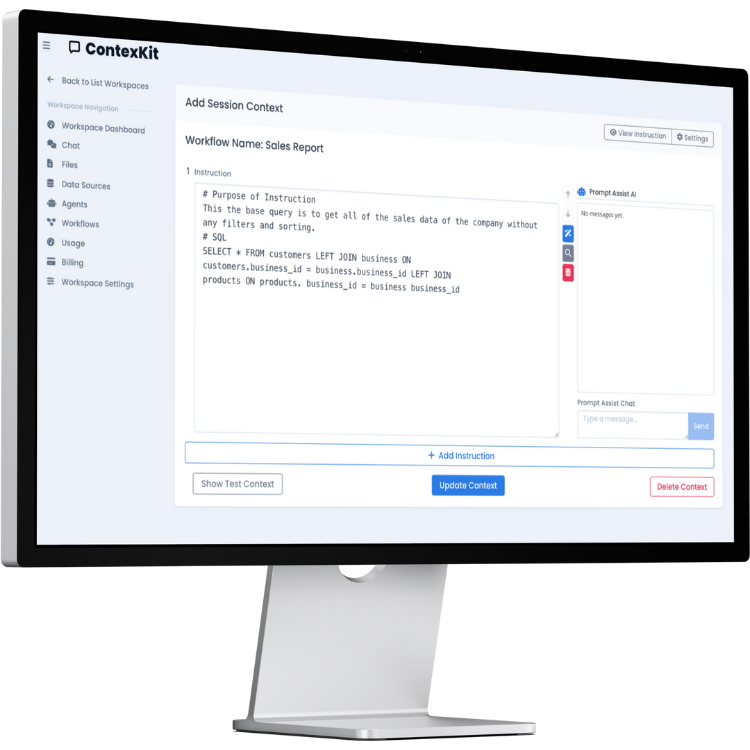
What does a database agent do?
A database agent is purpose-built to work with your data sources: it understands schema, uses defined joins and rules, and produces outputs your team can trust. Think of it as an AI database agent or database assistant that includes governed text-to-SQL for questions, plus guarded workflows for database actions and approvals.
Reliable context
Add schema, rules, and examples so outputs stay consistent across teams.
Governed access
Least-privilege credentials, RBAC/RLS-aware workflows, and reviewable runs.
Auditable actions
Trace logs and reversible operations for safer inserts, updates, and deletes.
Related: SQL Agent for analytics teams · Text-to-SQL overview
How a database agent works
A database AI agent connects to your database, learns the schema and rules you define, turns natural-language questions into SQL, and can optionally execute SQL actions with approvals. Each run produces an audit trail and supports reversible operations.
Connect & read schema
Connect a database and scope the tables and columns the agent can access.
Add context
Define rules, examples, and canonical joins to guide SQL generation.
Generate + validate SQL
Convert questions into SQL and validate against policies before running.
Execute safely + log everything
Run approved actions, capture audit logs, and store rollback info.
Best practices
Start read-only, require approvals for writes, define canonical joins, and keep a business glossary for shared metrics.
Security & governance
ContexKit supports governed text-to-SQL and database actions without claiming certifications. You can align access to your security model and implement RBAC/RLS-aware workflows with scoped credentials, including SQL actions with approvals. Learn more about SQL Agent governance and text-to-SQL safety.
Governance controls
- Least-privilege credentials (read-only by default)
- Guardrails: allowed tables/columns, row-level constraints
- Approval steps for write actions (human-in-the-loop)
- Parameterized queries to reduce injection risk
- Environment separation (dev/prod)
Auditability & reversibility
- Trace logs of prompt/context/SQL
- Reproducible runs
- Reversible operations (undo-friendly patterns)
- Change previews and diffs before executing
ContexKit is designed to fit existing access models rather than replace them, so RBAC/RLS policies remain the source of truth.
Examples: Question → SQL → Result
Examples are illustrative—your schema and rules define what’s allowed.
Revenue analytics (read-only)
Question: What were total sales by month in Q4?
SELECT month, SUM(total_amount) AS revenue
FROM orders
WHERE order_date >= '2025-10-01' AND order_date < '2026-01-01'
GROUP BY month
ORDER BY month;
What gets logged:
- Context version + schema snapshot
- SQL hash and execution timestamp
- Row count and runtime
Operations workflow (controlled write)
Question: Mark invoice 8432 as paid.
UPDATE invoices
SET status = 'paid', paid_at = NOW()
WHERE invoice_id = 8432;
What gets logged:
- Approval request + approver identity
- Execution timestamp and affected rows
- Reverse query for rollback
Writes can require approvals based on your policy.
Common use cases
A database agent for analytics, operations, finance reporting, and customer support lookups helps teams get fast, governed answers with less SQL overhead.
Self-serve analytics
Business teams ask questions in natural language, with consistent text-to-SQL outputs.
Governed reporting
Standardize queries and business logic across departments with shared contexts.
Operational workflows
Complete tasks tied to your rules: lookups, validations, and controlled write actions.
Audit & compliance
Review traces of what was generated and executed for compliance and debugging.
Safe data changes
Use reversible operations to reduce the cost of mistakes when writes are required.
Team enablement
Give teams a shared “how we query data here” layer without adding new dashboards first.
Finance
Month-end close questions, variance checks, and controlled adjustments with audit logs.
RevOps / Sales Ops
Pipeline analysis, churn tracking, and forecast checks using governed text-to-SQL.
Support / Ops
Account status and entitlement lookups with least-privilege access and RBAC/RLS.
Database Agent vs SQL Agent vs Text-to-SQL
Choose the right approach based on goal, governance, and scope.
| Capability | Database Agent | SQL Agent | Text-to-SQL |
|---|---|---|---|
| Primary goal | Governed answers + safe SQL actions | Natural-language analytics | Query translation |
| Generates SQL | Yes | Yes | Yes |
| Executes writes | Optional, with approvals | Typically read-only | No |
| Governance/approvals | Built-in | Lightweight | None by default |
| Audit logs | Comprehensive | Available | Limited |
| Best for | Ops, finance, support | Analytics teams | Prototyping |
Which page should I read?
- If you need governed access and approvals, start here on the database agent page.
- If you primarily need analytics, visit the SQL Agent overview.
- If you only need NL → SQL translation, see the text-to-SQL page.
Connections
Connect your data sources and bring your own model endpoint when needed. For production databases, read replicas are recommended.
Supported databases
- Postgres
- MySQL
- MCP
Common data sources include analytics databases, production replicas, and shared reporting databases.
External model endpoints
Use hosted or local models (for example, Ollama) by providing a base URL, depending on your deployment needs.
FAQ
Answers about AI database agents, governed text-to-SQL, and safe SQL actions.
What is a database agent?
A database agent connects to your SQL data sources, applies schema and rules, and helps teams query or take controlled actions with audit logs.
How is it different from text-to-SQL?
Text-to-SQL focuses on translation. A database agent adds governance, approvals, audit logs, and optional SQL actions.
How do you keep it safe for production databases?
Use least privilege, restrict tables/columns, require approvals for writes, and log every run. Many teams start on read replicas.
Can it work with Postgres/MySQL?
Yes. ContexKit supports common SQL databases including Postgres and MySQL.
Does it support RBAC/RLS?
ContexKit can be configured to respect RBAC/RLS by using scoped credentials and row-level constraints.
What do you log for auditing?
Logs typically include context version, generated SQL, execution timestamps, and affected rows for reproducible runs.
Can actions be reversed?
Yes. Reversible operations can generate rollback queries to undo changes safely when policies allow.
Do I need to migrate data or build dashboards first?
No migration required. You can connect existing databases and start with read-only questions.
What teams benefit most?
Finance, RevOps, support, and operations teams benefit most from governed access and quick answers.
Put a database agent behind your workflows
Connect data, add rules, and enable self-serve answers with governed access and auditability.