SQL Agent for Enterprise Databases
ContexKit turns natural language into governed SQL, so teams can get answers fast while keeping access controlled and auditable.
- Text to SQL
- Least-Privilege Access
- Auditable & Reversible
What is a SQL Agent?
A SQL Agent translates natural-language questions into SQL queries, runs them against your database, and returns results in a predictable format. It’s often powered by text-to-SQL and becomes much more useful when it understands your schema, joins, and business rules.
In other words, it connects natural language to SQL with guardrails so the right people get the right answers at the right time.
In practice, an AI SQL agent needs more than natural language SQL translation. It must ground on schema, enforce guardrails, and use execution policies so results are safe and consistent. Many teams refer to this as a SQL assistant because it delivers answers with predictable formats and traceability.
For enterprise databases, governed SQL means controlled access, clear definitions, and auditability. ContexKit focuses on these fundamentals so teams can trust results across analytics and operations.
What a good SQL Agent should do
- Understand schema and joins
- Follow business definitions and a shared glossary
- Generate safe SQL (parameterized, limited scopes)
- Return results in consistent formats
- Provide audit logs and traceability
Who it’s for
- Ops and finance teams that need answers now
- Data teams that want governed self-serve
- Product teams building analytics into apps
What ContexKit adds
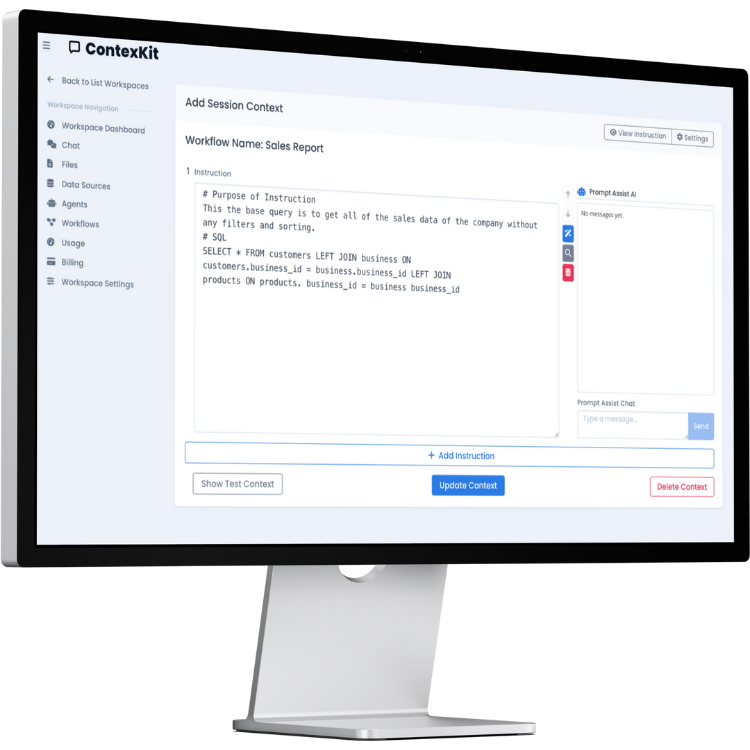
- Context engineering: schema + rules + examples
- Auditable traces for review and compliance
- Reversible operations for safer changes
If you need actions beyond queries, see the Database Agent for governed workflows. If you only need NL → SQL, see the Text-to-SQL overview.
How ContexKit works
A practical workflow for reliable text-to-SQL and safe database actions.
1) Connect your database
Plug in Postgres, MySQL, or MCP. Use read-only credentials where possible and keep data in your own cloud.

2) Add schema-aware context
Select tables, define joins and business rules, set output formats, and add examples so the SQL agent stays consistent.

3) Ask. Audit. Act.
Ask natural-language questions. ContexKit generates SQL, executes with least privilege, and returns answers with traces for review.
Governed SQL, not magic
ContexKit is designed so a SQL Agent can be used safely in real organizations. You define access and rules, and you can review what happened.
Least privilege
Use the minimum credentials required and respect existing RLS/RBAC controls.
Auditable traces
Track what the agent saw, generated, and executed so teams can review outcomes.
Reversible actions
Undo INSERT, UPDATE, and DELETE workflows with generated reverse queries.
Why teams use a SQL Agent
Common benefits for analytics, operations, finance, and customer support reporting.
Faster self-serve analytics
Answer questions quickly without waiting for SQL backlog or dashboard updates.
Fewer ad-hoc requests
Reduce interruptions for data teams by standardizing natural language to SQL workflows.
Standardized definitions
Use shared business logic so “revenue” and “active” mean the same across teams.
Safer access via least privilege
Limit scope and permissions while still enabling fast answers.
Auditable results
Keep trace logs for reviews, compliance, and reproducibility.
Reusable query patterns
Save context so repeated questions produce consistent outputs.
Teams often start with a SQL agent for finance, operations, product analytics, and customer support reporting before expanding to broader workflows.
Examples: Questions → SQL → Answer
Examples are illustrative—your schema and policies define what’s allowed.
MRR by plan (read-only)
User question: What was MRR by plan last month?
SELECT plan, SUM(mrr) AS total_mrr
FROM subscriptions
WHERE billing_month = '2025-11'
GROUP BY plan
ORDER BY total_mrr DESC;
Returned output format: Table + short summary
- Context version
- SQL hash
- Execution timestamp
- Row count
Churn analysis (read-only)
User question: Which customers churned in the last 30 days and why?
SELECT c.customer_id, c.plan, r.reason
FROM churn_events r
JOIN customers c ON c.customer_id = r.customer_id
WHERE r.churn_date >= CURRENT_DATE - INTERVAL '30 days';
Returned output format: Table + grouped summary
- Context version
- SQL hash
- Execution timestamp
- Row count
Overdue invoices (reviewed)
User question: Prepare an update statement for overdue invoices.
UPDATE invoices
SET status = 'follow_up'
WHERE due_date < CURRENT_DATE
  AND status = 'open';
Returned output format: Proposed update + recommended next action
- Context version
- SQL hash
- Execution timestamp
- Row count (preview)
Writes are optional and can require approval.
Use cases by role
For teams who don’t want to write SQL daily, but need trustworthy answers.
Finance
- Revenue and margin breakdowns
- AR aging and collections status
- Month-end close checks
RevOps / Sales Ops
- Pipeline and conversion analysis
- Cohort performance and churn trends
- Territory and segment reporting
Product / Analytics
- Feature adoption by cohort
- Funnels and activation rates
- Retention and usage trends
Support / Ops
- Account status and entitlement checks
- SLA reporting and backlog insights
- Incident impact summaries
Security, governance, and reliability
ContexKit focuses on governed SQL for enterprise databases using principles you can configure to match your policy.
Safety defaults
- Read-only credentials by default
- Scoped table and column access
- Parameterization and query limits
- Rate limiting / throttling can be configured
- Environment separation (dev/prod)
Governance workflows
- Human approval for risky queries or writes
- Trace logs for audits
- Reproducibility with consistent context
- Reversible operations for writes (optional)
These principles help teams maintain least privilege and align to RBAC/RLS policies without claiming certifications.
SQL Agent vs Database Agent vs Text-to-SQL
Compare scope, governance, and setup effort.
| Capability | SQL Agent | Database Agent | Text-to-SQL |
|---|---|---|---|
| Best for | Governed analytics | Governed workflows + actions | Query translation |
| Generates SQL | Yes | Yes | Yes |
| Executes actions/writes | Optional, controlled | Yes, with approvals | No |
| Governance/approvals | Supported | Built-in | None by default |
| Audit logs | Available | Comprehensive | Limited |
| Reversibility | Optional | Yes | No |
| Setup effort | Moderate | Higher | Low |
Which should I choose?
- For governed analytics, stay here on the SQL Agent page.
- If you need actions or approvals, see the Database Agent overview.
- If you only need natural language to SQL translation, see Text-to-SQL.
FAQ
Answers about SQL agents, natural language SQL, and governed access.
What is a SQL Agent?
A SQL Agent is an AI SQL agent that converts natural-language questions into SQL, executes queries with governance, and returns reliable outputs.
Is a SQL Agent the same as text-to-SQL?
Text-to-SQL is the translation layer. A SQL Agent adds schema grounding, safe execution policies, and audit logs.
How does a SQL Agent know the right joins?
You provide context: schemas, canonical joins, and business definitions so the SQL assistant can choose the correct relationships.
How do you keep the SQL safe?
Use least privilege, scoped access, and parameterized queries with audit logs for traceability.
Can it work with Postgres/MySQL?
Yes. ContexKit supports common SQL databases such as Postgres and MySQL.
Can it respect RLS/RBAC?
ContexKit is designed to respect RBAC/RLS by using scoped credentials and row-level constraints.
What is logged for auditing?
Logs typically include context versions, generated SQL, execution timestamps, and row counts.
Can it be used by non-technical teams?
Yes. Natural language SQL allows non-technical users to get answers while policies control access.
Does it replace BI tools?
It complements BI tools by supporting ad-hoc questions; dashboards still serve recurring reporting.
When should I use a Database Agent instead?
Use a Database Agent when you need approvals, actions, and reversible operations beyond queries.
Build your SQL Agent with your rules
Start in minutes, connect a database, and add context so your team can get answers without writing SQL—with governed access and auditability.